Conversations with Todd

Wednesday, November 18, 2015


This week we are thrilled to bring you another video from are new series on the blog: Conversations with Todd.  Conversations with Todd are a series of videos where Todd Forsyth, Technical Lead and Executive Staff Member here at Robert Stephen Consulting, LLC. discusses different aspects of the industry.  Be sure to keep your eyes open for more Conversations with Todd!


Like what you saw?  Subscribe to the blog and follow us on Twitter, Facebook, Linkedin and Pinterest to keep up to date with the latest news from Robert Stephen Consulting, LLC.

Thoughts? Questions?  Comment below and let us know what you think!  We'd love to hear your insights.


Friday Training Follow Up: Types of Reports in ARCHIBUS

Monday, November 16, 2015


Robert Stephen Consulting, LLC provides free 30-minute Client Training session every Friday at 10:00AM PST!  RSC prides itself in providing learning opportunities for our clients.  We feel that if our clients know the system better, we will able to work better with them to discover and implement the solutions that they need.

Last week Bob Stephen, our CEO & Managing Director discussed Reporting in ARCHIBUS.

Specifically, we covered the Four Types of Reports in ARCHIUBS.  These reports include
  1. C & VP Level Reports
  2. Director and Manager Reports
  3. Individual Contributor Reports
  4. Reports for Staff at Large
If you'd like to know more about this particular training, email us at training@rsc2lc.com

We’d love to have you join us for this week's training on Plain AutoCAD Basics this Friday 11/20.  Please register for the training here:
https://attendee.gototraining.com/r/6239139519237186817

Registering is required to receive a confirmation email and a link to the training.

Our weekly client trainings are held Fridays from 10:00 to 10:30am.  This is an opportunity to learn more about an area of ARCHIBUS that you may not be familiar with.  

We look forward to seeing you there!


Like what you read?  Subscribe to the blog and follow us on Twitter, Facebook, Linkedin and Pinterest to keep up to date with the latest news from Robert Stephen Consulting, LLC.

Thoughts? Questions?  Comment below and let us know what you think!  We'd love to hear your insights.


Conversations With Bob

Wednesday, November 11, 2015


This week we are thrilled to bring you another video from are new series on the blog: Conversations with Bob.  Conversations with Bob are a series of videos where Bob Stephen, CEO & Managing Director of Robert Stephen Consulting, LLC. discusses different aspects of the industry.  Be sure to keep your eyes open for more Conversations with Bob!


Like what you saw?  Subscribe to the blog and follow us on Twitter, Facebook, Linkedin and Pinterest to keep up to date with the latest news from Robert Stephen Consulting, LLC.

Thoughts? Questions?  Comment below and let us know what you think!  We'd love to hear your insights.


Friday Training Follow Up: System Navigation

Monday, November 9, 2015


Robert Stephen Consulting, LLC provides free 30-minute Client Training session every Friday at 10:00AM PST! RSC prides itself in providing learning opportunities for our clients. We feel that if our clients know the system better, we will able to work better with them to discover and implement the solutions that they need.

Last Friday's training was led by our Tech Lead, Todd.  The topic he covered was System Administration, specifically Page Navigation.  Todd discussed the four basic types of navigation:
  1. Accessibility Navigator
  2. Process Navigator
  3. Dashboard
  4. Page Navigator (Home Pages)
Before taking a deeper look at Page Navigator.  During the in depth overview, he covered:
  • How to use Page Navigator
    • What you can have on your Home Page
    • How to toggle between multiple home pages
    • Working on Tasks
    • The Applications Tab
    • The "My Favorites" Panel 
  • How to build a Home Page 
    • Adding a Navigation Page
    • Building the xml Descriptor Page
    • Background Shading
  • and  of course some Best Practices 
If you'd like to know more about this particular training, email us at training@rsc2lc.com

We are excited to announce this week's Client Training!  It will be held on Friday 11/13.  Below are some details on registering:

Please register for RSC's Friday Client Training: Reports, specifically Basic Report Types, on Friday, November 13, 2015 10:00 AM - 10:30 AM PST at:https://attendee.gototraining.com/r/743991509845256705

After registering you will receive a confirmation email containing information about joining the training.>

Can't wait to see you there!

Like what you read?  Subscribe to the blog and follow us on Twitter, Facebook, Linkedin and Pinterest to keep up to date with the latest news from Robert Stephen Consulting, LLC.

Thoughts? Questions?  Comment below and let us know what you think!  We'd love to hear your insights.


AutoCAD Advantages: What is Polylining?

Friday, November 6, 2015


This week's article comes to you courtesy of our very own Matt!  Matt is our AutoCAD expert here at RSC.

What is Polylining?

Drawing clean up consists of:

  1. Determining accurate locations of physical objects
  2. Reconciling the drawings to CAD standards (using proper layers, naming conventions, and blocks)
Someone must walk the floors, taking measurements and accounting for the space.  They will then provide a fairly accurate representation of each floor of the building.  They will indicate where walls, windows, doors, stairs, offices and desks are located.  Their completed drawing will look something like this:

 Polylining consists of:

  1. Creating representations of physical objects (usually polyline shapes) in the drawing.  In this case, it will be the physical area occupied by each room, using BOMA standards.
  2. Connecting those drawing objects to the database, by providing a primary key (or unique identifier) that specifies that particular room.
  3. Adding additional information to each room object in the database so that properties of the space can be tracked.  We add room types, categories and standards, so that the database can run reports on how much space is occupied by services (Primary Circulation and Mechanical Rooms, for instance.)
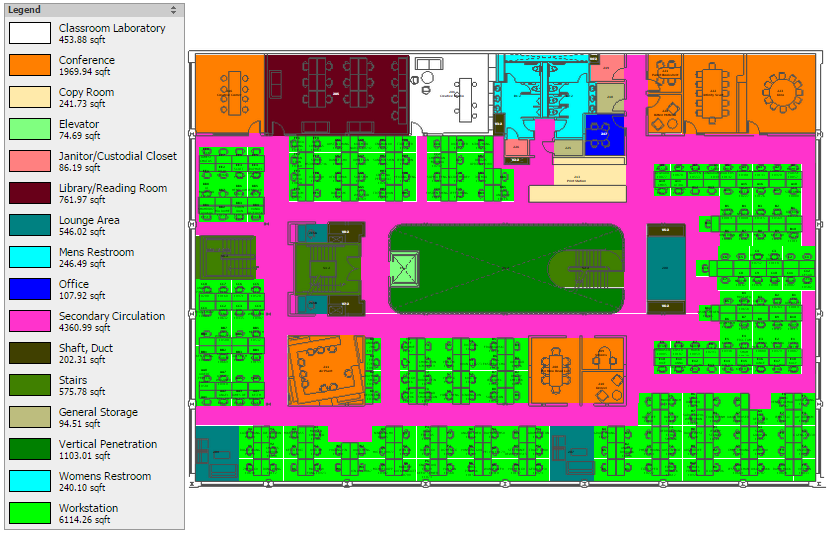
Polylining basically starts with a drawing that is essentially a collection of colors and shapes and adds a layer of information on top of it.  This information can be mined for interesting relationships and reports.

Here is an image of a shaded floorplan indicating all the room types on this floor.  The polylines are the boundaries of the individually shaded rooms.


Like what you read?  Subscribe to the blog and follow us on Twitter, Facebook, Linkedin and Pinterest to keep up to date with the latest news from Robert Stephen Consulting, LLC.

Thoughts? Questions?  Comment below and let us know what you think!  We'd love to hear your insights.


Conversations with Todd

Wednesday, November 4, 2015


Bob: On the MicroView Tablet side we just worked with a social media company in the Silicon Valley where we have over 50 individuals doing daily surveys using the MicroView tablet. Talk to me about the success there and some of the challenges.

Todd: It’s an internet company, and they build online web applications all the time. They are used to seeing a very sexy, cool interface built into their products and expect the same of us. I think that’s been the challenge, but it’s also an opportunity. They’ve pushed us and we’ve pushed ourselves to build out MicroView tablet in ways that make it capable of doing things that we’re very proud of, but that are difficult things to do. The room and equipment surveys that it can do and the capability it has of plotting those on a map and letting you see the status of those equipment surveys at any given time are really impressive capabilities and something that I think many clients are going to be able to make great use of.

Three Open Source javascript UI Tools

Friday, October 30, 2015

This week we have another article courtesy of Todd, our Technical Lead at Robert Stephen Consulting, LLC.  Enjoy!

At RSC, we specialize in installing, hosting and managing ARCHIBUS IWMS systems.  We also write our own software to enhance ARCHIBUS capabilities.  These days, more and more of that software is written in javascript and HTML5.

In this post, I’m going to briefly talk about three open source tools I find make the job of building and managing a javascript user interface simpler.  Here’s the list:
  1. jQuery
    • A set of tools that make it easier to work with DOM objects (among other things)
  2. Block UI
    • A handy tool to “freeze” the UI while something important is happening
  3. mustache
    • A templating tool for easily rendering the contents of arrays and variables
And now a more detailed description of each, and why each is useful:

1.    jQuery

Link:    https://jquery.com/
I’ve been using jQuery for about 6 months now, and know I’m only scratching the surface of what it can do.  I use it to easily find and manipulate DOM (Document Object Model) objects (“find me an object with this ID”), and to easily use ajax to send data to and receive data from the server.  jQuery does a LOT of things:  HTML/DOM manipulation, CSS manipulation, HTML event methods, Effects and animations and Ajax.  It also does some cool things with storing and retrieving data.   It’s probably the most popular javascript library there is, and because it’s open-source, this means there are ALSO a lot of plugins that extend what it can do.  Here’s a great link to get starting finding these:

 https://learn.jquery.com/plugins/finding-evaluating-plugins/

Also, a quick list of the best reasons to use jQuery yourself:
  • jQuery is light; the code needed to run it is small, so it won’t significantly increase the time for server response.
  • Even with all the power it brings to bear, the jQuery library is open source and free.
  • It’s easy to learn; if you can program javascript already, this will just look like a toolbox of easily-mastered shortcuts to you.
  • It’s cross-platform, running on all major browsers and on computers and mobile devices.
To be open about it, there IS some criticism of jQuery by javascript purists, particularly in the way it handles an important component of asynchronous operations called “promises.”  Given the problems it solves, these are problems I’m more than willing to live with.

2.    BlockUI

Link:    http://malsup.com/jquery/block/ 
Speaking of jQuery plugins, here’s one now!  BlockUI  will “freeze” a web page by fading it out, showing a spinning “busy” indicator, and a custom message.  It also prevents user interactions with the page.  This can be very handy when you’re doing things like loading a lot of data in the background, or busy building the page objects, and the code to handle what pushing a button will do.

Once you include the library, blocking the UI, even with a custom message, is pretty easy.  Here’s the code to do it:

$.blockUI({ message: '<h1><img src="busy.gif" /> Just a moment...</h1>' });

Unblocking is just as simple.

I was impressed with this plugin because I’m trying to blend the old and new worlds of forms and javascript for the short term, until I get a complicated form-based UI re-written in modern Responsive Design fashion.  BlockUI (in combination with jQuery) allowed me to handle this gracefully, freezing the whole frameset, instead of worrying about each individual “page” within it.

3.    mustache

Link:    https://mustache.github.io/
Do you have a lot of data (arrays, variables, objects) that you’re trying to show your user as HTML?
Tired of writing loops to get you through the arrays, or “if” tests to decide whether particular things should be shown at all?  mustache is a neat little library that allow you to create what the creators call “Logic-less templates.”  You just include the mustache library, define your HTML as a template, add some specially-formatted tags, then populate the variables, and tell mustache to render the template using the variables.  Simple goodness.  A quick example, so you can see how easy it is: 

A typical Mustache template:

Hello {{name}}
You have just won {{value}} dollars!
{{#in_ca}}
Well, {{taxed_value}} dollars, after taxes.
{{/in_ca}}
Given the following hash:
{"name": "Chris",
  "value": 10000,
  "taxed_value": 10000 - (10000 * 0.4),
  "in_ca": true}
Will produce the following:
Hello Chris
You have just won 10000 dollars!
Well, 6000.0 dollars, after taxes.

As you can see, the tags tend to look like this:  “{{name}}”, and the curly brace on its side looks not unlike a mustache.  So the name is pretty easy to understand.


Like what you read?  Subscribe to the blog and follow us on Twitter, Facebook, Linkedin and Pinterest to keep up to date with the latest news from Robert Stephen Consulting, LLC.

Thoughts? Questions?  Comment below and let us know what you think!  We'd love to hear your insights.

 
Here’s hoping you find these as useful as I have!